Secure SSH Access Using 1Password SSH Agent Vault – No Local Key Storage Required!

Why Do We Need This?

In many of our teams, users, including developers, DevOps engineers, and other technical staff, require SSH access to multiple machines. Traditionally, SSH keys have been shared among users, which introduces security risks, as keys can be lost, mismanaged, or exposed. Additionally, assigning and revoking keys when team members join or leave the team is a labor-intensive task.

Possible solution we looked at

We needed a centralized and secure approach where SSH keys are stored in a vault, rather than being distributed across individual local machines. Users are granted read-only access to the vault, allowing them to authenticate without downloading or manually managing SSH keys.

Tool We found 1Password SSH Agent

After evaluating different solutions, we found 1Password SSH Agent to be the best fit. With this setup, users can log in seamlessly using:

ssh user@hostname

No need to download , specify or handle keys manually—the 1Password agent securely manages authentication in the background. Let's explore how this works on a windows machine

To use the 1Password SSH agent on Windows, you need to configure 1Password’s built-in SSH agent feature, which allows you to securely manage and use your SSH keys stored in 1Password. Here’s how to set up and use the 1Password SSH agent on Windows:

Steps to Use the 1Password SSH Agent on Windows:

1. Install and Set Up 1Password on Your System

  • If you haven’t already installed 1Password on your Windows machine, download it from the 1Password website.
  • Sign in to your 1Password account.

2. Enable SSH Agent Feature in 1Password

1Password includes an SSH agent that allows you to securely store and use SSH keys directly from your 1Password vault.

  • Open the 1Password app.
  • Go to Settings.
  • Navigate to the Developer section.
  • Toggle on the option for “Use 1Password as your SSH Agent”.

This will configure 1Password to act as an SSH agent for your system.

3. Add SSH Keys to 1Password

To use SSH keys with the 1Password agent, you’ll need to store your private SSH keys in 1Password.

  • In 1Password, click + New Item and choose SSH Key from the list of options.
  • Add your private SSH key (typically from a file like id_rsa), and you can also set a label or other metadata for the key.
  • Save the key.

This key is now stored in your 1Password vault and will be used by the 1Password SSH agent.

4. Configure SSH to Use the 1Password Agent

Next, you need to configure your SSH client to use the 1Password SSH agent. The 1Password SSH agent runs on a named pipe that acts similarly to the ssh-agent provided by OpenSSH.

  • Open your SSH configuration file:
    • Path: C:\Users\YourUsername\.ssh\config (create this file if it doesn’t exist).
  • Add the following configuration to ensure the SSH client uses the 1Password agent:
Host *
IdentityAgent \\.\pipe\openssh-ssh-agent

This configures the SSH client to use the 1Password agent for all hosts (Host * applies to all SSH connections).

5. Test SSH Authentication with 1Password

Once the 1Password SSH agent is enabled and the configuration is in place, test it by connecting to an SSH server.

For example:

ssh user@hostname

The 1Password SSH agent should now provide the stored SSH key for authentication. If you have multiple SSH keys in 1Password, the agent will offer the appropriate key for the host you’re connecting to.

6. Using 1Password CLI (Optional)

If you prefer more control or want to use 1Password’s CLI tool, you can install the 1Password command-line tool and manage SSH keys and other credentials directly from your terminal.

To install the 1Password CLI on Windows, use PowerShell:

Invoke-RestMethod -Uri https://downloads.1password.com/cli/1password-cli-win64.zip -OutFile 1password-cli-win64.zip
Expand-Archive 1password-cli-win64.zip -DestinationPath C:\op

You can then run op commands to interact with your 1Password vault. However, the built-in SSH agent in the desktop app is usually sufficient for SSH key management.

Key Features of 1Password SSH Agent:

  • Automatic Key Usage: 1Password automatically offers the correct SSH key when authenticating with an SSH server, without needing manual ssh-add commands.
  • Enhanced Security: SSH keys are stored securely in your 1Password vault, protected by your master password and 2FA.
  • Cross-platform: The 1Password SSH agent works across multiple operating systems, including Windows, macOS, and Linux.

Summary

By enabling the 1Password SSH agent and configuring SSH to use it via the IdentityAgent option, you can seamlessly authenticate SSH connections on Windows using the SSH keys securely stored in your 1Password vault. This allows you to centralize SSH key management and take advantage of 1Password’s security features.

RAG – Retrieval-Augmented Generation

What is RAG ?

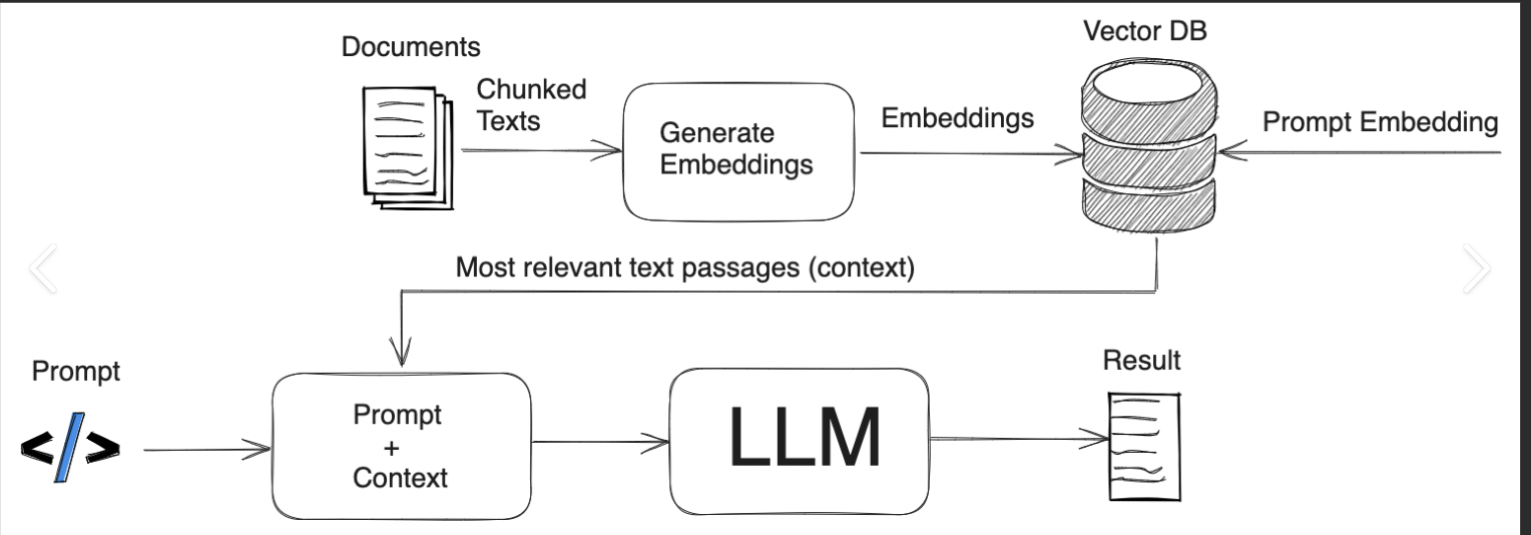
RAG (Retrieval-Augmented Generation) enhances AI responses by retrieving relevant external data before generating a response from an LLM.

  • Retrieval – Retrieve (from a Vector DB)
  • Augment – Combine the retrieved information with the original query
  • Generation – The LLM then uses this augmented data to generate a response to the user’s query.

In the first place why should we retrieve data form external system?

Retrieving data from an external system ensures that the LLM generates more accurate, up-to-date, and contextually relevant responses, especially for dynamic or domain-specific queries beyond its trained knowledge.

Can you explain with one real world use case?

RAG can be used at different levels based on the product requirement, let me give an example with one of the use case at a product platform level , which i worked.

In complex product platforms, we document solutions to recurring production issues in a runbook to streamline future resolutions. One such challenge we faced was during Blue-Green deployments using AWS RDS. While AWS claims the migration and switching take only a few seconds, real-world scenarios proved otherwise. Through 30+ deployments, we discovered that fine-tuning database parameters was crucial in reducing replication time and ensuring a seamless transition—insights not documented in any standard LLM.

To make this kind of knowledge easily accessible, we integrated an LLM-powered assistant with our Confluence knowledge base using Retrieval-Augmented Generation (RAG). This setup ensures that queries to the LLM are enriched with real-world, product-specific insights, enabling developers to get precise answers instantly.

This approach not only democratized critical knowledge but also enhanced automation and self-healing capabilities within our systems. By leveraging RAG, we bridge the gap between static documentation and real-time AI assistance, empowering our teams with actionable intelligence at their fingertips.


What are   embeddings?

Embeddings are numerical representations of data (such as words or items) in a high-dimensional vector space, where similar data points are mapped closer together. Examples include Word2Vec and FastText.

What is Vector DB?

A vector database is a specialized database designed to efficiently store, search, and manage vector embeddings.

Examples:

  • On-Premises: FAISS, Weaviate
  • Managed Vector Databases: Pinecone, Weaviate, Milvus

Embeddings in Vector DB:

In a vector database, words are represented as numerical embeddings based on their semantic meaning.

Example Embeddings:

  • “mysql” → [0.32, -0.47, 0.51, …, 0.15]
  • “oracle” → [0.30, -0.45, 0.48, …, 0.14]
  • “tcp” → [0.52, -0.30, 0.78, …, 0.12]

If a query is made with the word “oracle”, the vector database will identify the most similar vector. In this case, it would likely return “mysql” since both are database management systems (DBMS) and have closely related embeddings, just have a look at those numbers also,  how close they are, whereas “tcp” is conceptually different and farther in vector space and the numbers are also little farther. 

How are these words retrieved from vector DB with numbers being in vector DB?

This is achieved using algorithms that identify information semantically related to the user’s query.

Examples of Algorithms:

  • K-Nearest Neighbor (k-NN)
  • Hierarchical Navigable Small World (HNSW)

Using these algorithms, we retrieve relevant data and append it to the user’s query before passing it to the LLM. This provides the LLM with additional context that it wouldn’t have otherwise, enhancing its understanding. This process is known as augmentation.  

Benefits of Augmentation

  • Improved accuracy and richness of responses.
  • Decreased ambiguity when the user’s query lacks sufficient context.
  • Faster and more scalable retrieval of relevant knowledge using pre-existing information in the database.


Let us understand this with an example on how a query is augmented 

Step 1: User Query: “User Query: “How can I control replica lag in MySQL?

Step 2: Search in Vector DB:
The vector database retrieves documents related to replica lag and DB parameters associated with replication SQL thread which are already fed 

Step 3: Augment the Query

The system then combines the retrieved information with the original query to form an augmented query:

Augmented Query: “How can I control replica lag in MySQL? Replica lag can be controlled by tuning the following DB parameters associated with replication SQL thread: binlog_order_commits = 0, binlog_group_commit_sync_delay = 1000, slave_parallel_type = LOGICAL_CLOCK, slave_preserve_commit_order = 1. Additionally, you can adjust slave_parallel_workers = 2, innodb_flush_log_at_trx_commit = 0, and sync_binlog = 1 to control replication behavior and performance.”

Where is the source of additional data ?

The data is retrieved from a Vector Database that we populated using our knowledge base, which includes sources such as Confluence pages ( used this in my example here ), databases, support tickets, GitHub repositories, and more.

Step 4:  The augmented query is now sent to the LLM, which now has all the relevant information to generate a complete, detailed response.

Quick Example running through all the above steps: 

Knowledge Base – Confluence 

https://helloravisha.atlassian.net/wiki/external/OTJmYWI0MjkwOWViNDg0YmEzMjRiZGYxYWMwNzdkZGY

RAG Python code – Confluence, Open AI

from dotenv import load_dotenv
from langchain.embeddings.openai import OpenAIEmbeddings
from langchain.vectorstores import FAISS
from langchain.chains import RetrievalQA
from langchain.chat_models import ChatOpenAI
from atlassian import Confluence
import os

# Step 1: Load environment variables (for Confluence credentials and OpenAI API key)
load_dotenv()  # Loads .env file containing API credentials

# Connect to Confluence using API
confluence = Confluence(
    url=os.getenv("CONFLUENCE_URL"),
    username=os.getenv("CONFLUENCE_USERNAME"),
    password=os.getenv("CONFLUENCE_API_TOKEN")
)

# Step 2: Fetch documents (pages) from Confluence
def fetch_confluence_pages(space_key):
    # Fetch all pages from a specific Confluence space
    pages = confluence.get_all_pages_from_space(space_key, start=0, limit=50)  # Adjust limit as needed
    docs = []
    for page in pages:
        content = confluence.get_page_by_id(page["id"], expand="body.storage")
        text = content["body"]["storage"]["value"]  # Extract raw HTML content
        docs.append((page["title"], text))  # Store title and content
    return docs

# Replace with your space key
space_key = "5d27ad527d35310c144"
confluence_docs = fetch_confluence_pages(space_key)

# Convert Confluence page content into text format (title + content)
docs = [f"{title}: {text}" for title, text in confluence_docs]

# Step 3: Convert the text documents to embeddings using OpenAI
 

# Step 4: Set up the retriever to search through the vector store
retriever = vectorstore.as_retriever()

# Step 5: Create a Retrieval-Augmented Generation (RAG) QA system
qa_chain = RetrievalQA.from_chain_type(llm=ChatOpenAI(), retriever=retriever)

# Step 6: Ask a question (retrieves data from FAISS before responding)
query = "what parameters i should tune in to control  replica lag , tell me the values for  sync_binlog"
response = qa_chain.run(query)
print(response)

AWS Private Link – Shared Resource for Multi VPC

Setting up a common resource across different environments is always a redundant task, It not only incurs cost , it also takes time to test and validate the same , one such use case we see with is setting up a  License server with every new environment ( prod1, prod2 etc  ) , This redundant server setup problem can be solved , if the license server can be deployed as a shared resource and consumed from different environments deployed in different VPC’s.  

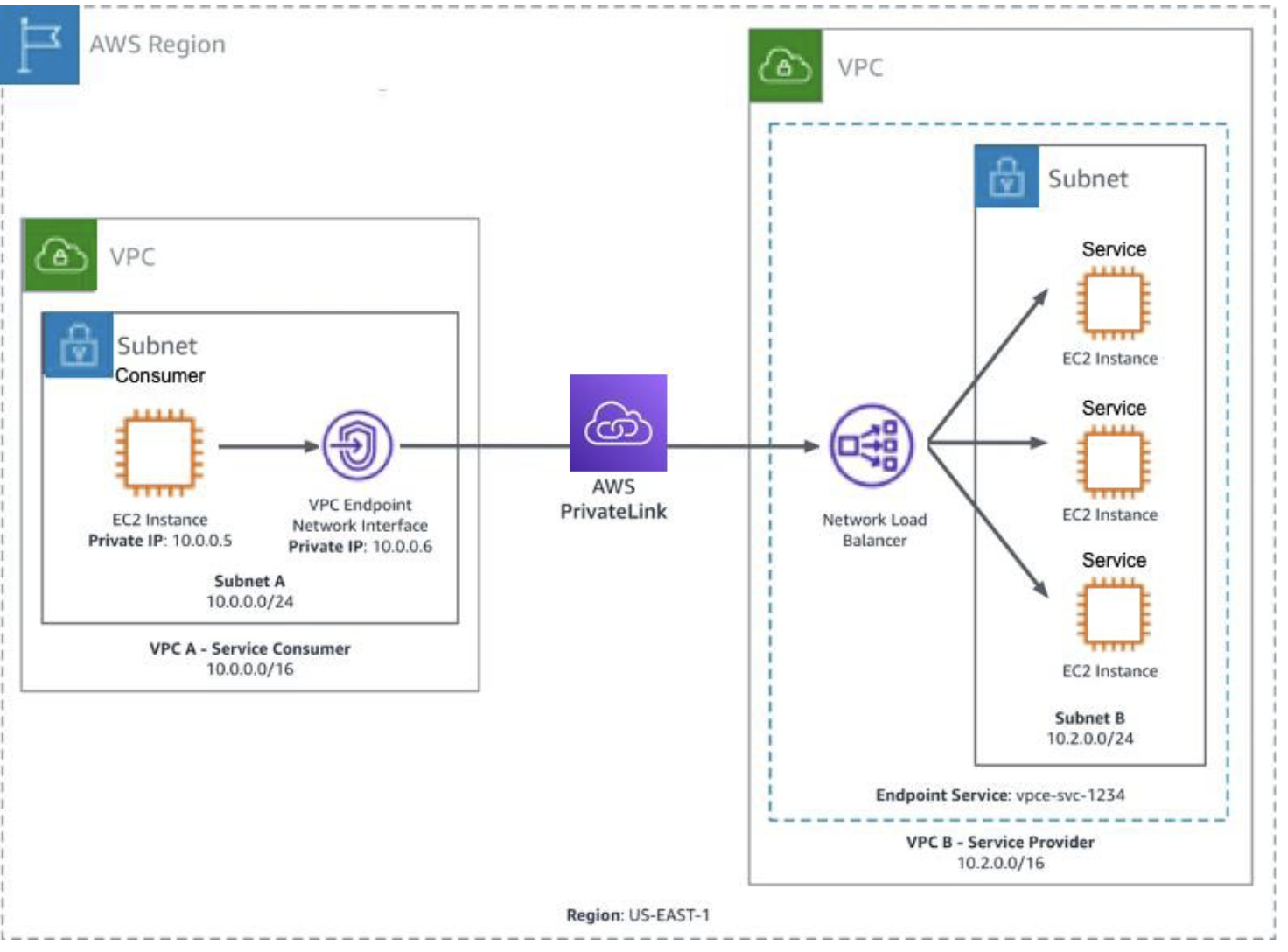
There are different solutions to solve the problem,  AWS private link is one solution for the same, it helps in setting up a shared resource in one VPC and provide  access to the client / environment configured  in another VPC without compromising on security and not exposing the traffic over internet.

More Info –   AWS private Link  – https://aws.amazon.com/privatelink/

AWS private link  can be configured using the following two VPC resources.

1) Endpoint Service ( Producer side  ,  used for exposing the shared resource via a Network load balancer- NLB )
2) Endpoint (Consumer  side, used for consuming the shared resource exposed using Endpoint service via a  Elastic Network interface – ENI  )

Endpoint service and Endpoint can be configured in different VPC’s within the same region Let’s see how an Endpoint Service and an Endpoint can be configured

Endpoint service (Producer side)

1) Endpoint service configuration can be done in any shared environment which can be consumed by different clients / environments.
2) Network Load Balancer ( NLB ) is a prerequisite for creating endpoint service and need to be configured with Endpoint service.
3) NLB can configured to the target where the shared resource is deployed.
4) In the current License server setup, license server is installed on EC2 as NLB target.

Endpoint Service Creation :

1) Go to VPC console, Select Endpoint Service from the left panel
2) select Endpoint and provide the required configuration.

Endpoint  ( Consumer side  )

Endpoint configurations need to be done on the consumer side for consuming the shared resource.
Endpoint requires the name of Endpoint Service.

Elastic Network Interface ( ENI ) is created and attached to Endpoint once the endpoint is created.    
Private IP address of the ENI acts as interface for accessing the shared resource exposed through Endpoint service.                                                                                                                                                                                                                      
Endpoint Creation :

1) Go to VPC  console , Select End point from the left panel as follows   
2) Select Endpoint and provide the required configuration as follows
2.1) select other endpoint service and give the name of the service ( this is name of the endpoint service , Eg: com.amazonaws.vpce.us-east-1.vpce-svc-XXXXXX) to be consumed.
        2.2) Click submit once the endpoint service name is given ,  once done with submit an Endpoint ( Interface Type ) is created along with a  Network Interface as shown below.
        2.3) Once Endpoint is created , it will not be ready to use, it requires an additional step of  approving respective endpoint from endpoint service console. After End point is approved from End point service , the status of Endpoint is shown as Available , until then we will see the status as Pending for approval Once the end point status is Available , end point is ready to be consumed using the private IP address of the Network interface created along with the End point.

** Private  IP address  of network interface used for consuming the shared endpoint service.  

Linking  Endpoint to Endpoint service –

1) Once Endpoint Service and Endpoint is configured, next step is to link Endpoint to Endpoint service for consuming the shared resource hosted on Endpoint Service.  
2) For approving Endpoint from Endpoint service, go to  Endpoint Service -→  Endpoints tab ,  select the respective endpoint and click on action and approve the End point.
3) Once done  , endpoint is ready to be consumed using the private IP address of the elastic network interface ( ENI ).  

Accessing Shared resource  –

Once Endpoint Service  and Endpoint are configured , clients  can access the shared service hosted with Endpoint service using Elastic Network Interface ( ENI ) private IP address created with Endpoint.

Accessing Centralized License Server:

our App makes use of Docker plugin for accessing the Licensed server.

docker plugin discovers the Licensed server using predefined IP , therefore following additional steps are required for accessing the centralized license server.

Launch a t3.nano machine  which acts as a proxy machine to connect to Endpoint.
Have a predefined IP – xxxx for the proxy machine  , This is a predefined IP configured for plugin for discovering the licensed server.  

To access the centralized license server from  the proxy machine,  Tunnel is configured  between Proxy machine and ENI  as follows

The Linux utility simpleproxy can be used to setup the proxy, once the utility is installed you can use the following command to setup the proxy.  

Eg : simpleproxy -L portno -R x.x.x.x:portno

x.x.x.x is  the IP address of the Network interface which will be pointing to the centralized server configured using AWS private link.

portno is port on which license server is listening for the incoming license requests.

Tunnel is setup as a service on the proxy machine using the following steps to make sure it’s up and running even after system restarts.

install simpleproxy  utility , more info on the untility  :  https://manpages.ubuntu.com/manpages/kinetic/en/man1/simpleproxy.1.html

usage of simpleproxy command

simpleproxy -L [local port on which you want to listen for remote requests] -R [remote host:remote port for which you want to proxy/tunnel to]

once simple proxy is installed , create a file named simpleproxy.sh  in /tmp  and add the following content.

simpleproxy -L 22350 -R 10.0.26.109:22350

Go to the directory :   cd /etc/systemd/system
Create a file named xxx-service.service and include the following

[Unit]
Description=xxx service

[Service]
User=root
WorkingDirectory=/tmp
ExecStart=/tmp/simpleproxy.sh
Restart=always

[Install]
WantedBy=multi-user.target
save the above file and then start the service using the following command.
systemctl start xxx-service.service

Once complete above configuration is in place ,  we are good to validate the centralized license server.


Mongo DB Disk Space Issue

Background :  We are currently facing Diskspace issue with our mongo DB collections used for logs,  these collections are configured with an expiration time and  are auto deleted once the time stamp expires , however when there’s very high activity, even before the time stamp expires, disk space is filled  with  flood of collections and this eventually results in running out of diskspace and mongo goes offline  , and this triggers a page to Ops which must be handled. 

We are using mongo version v3.0.10,  with the limitations we have in production environments,   we cannot upgrade the version .

To solve this  problem we looked at multiple options. 

1) Having a scheduled job and automatically removing a collection after a defined period, however disk space will not be returned immediately to the file system, and commands like db.repairDatabase() has to be used, this process can be tedious and will have an extra over head of having another job running as a service. 

2) Another way of approaching this problem might be  based on dates, You could then have a script to automatically drop databases based on dates , which would also return the disk space afterwards. but with the kind of problem we are dealing with , where we can have flood of data instantly, this is still not a right solution. 

The third option we are having,  is a built in option provided by Mongo DB known as  Capped collection and can help us solve the problem. 

Optimal Solution :

Capped collection is one mechanism to limit mongo collection disk space.  ( verified on Prod environment, with fix in the code )

In MongoDB, a capped collection is a specialized type of collection that differs from a regular collection. Unlike regular collections, capped collections have a fixed size, meaning they can only hold a certain amount of data. Once a capped collection reaches its maximum size, it automatically begins overwriting the oldest documents in the collection with new ones. This feature makes capped collections useful for scenarios like rolling dataset, such as logs or event tracking. This is a great way to keep a large amount of data, discarding the older data as time goes by and keeping the same amount of disk-space used. 

Create a Capped Collection 

  • Eg:  Create capped collection with Maximum size 200 Bytes
    •  db.createCollection( “log“, { capped: true, size: 200 } )
  • Eg: Create capped collection with Maximum size 200 Bytes,  with Max number of documents 50
    • db.createCollection( “log“, { capped: true, size: 200, max:50 } )

Modify existing collection  to capped collection 

  • Eg: db.runCommand({ “convertToCapped” : “log“, size: 500, max : 50 })

Check if  collection  is a capped collection 

  • Eg: db.log.isCapped()

Advantages

  • A capped collection maintains data in the order of insertion and eliminates the overhead of indexing. This characteristic enables it to facilitate high throughput for insertions.
  • A capped collection proves valuable for storing log information because it organizes the data based on event order.

Disadvantages:

  • A capped collection can’t be sharded.
  • A capped collection can’t have TTL indexes.

Here are some key differences between capped and normal collections in MongoDB:

  • Size: Capped collections have a fixed size limit, while normal collections can grow dynamically.
  • Overwriting: When a capped collection reaches its maximum size, it will automatically overwrite its oldest documents. Normal collections don’t have this feature.
  • Ordering: Documents in a capped collection are stored in insertion order.

Runbook ( CLI ) : For converting a collection to capped collection   

  1. SSH to the machine where Mongo DB is hosted. 
  2. Connect to Hybrik  MongoDB
    1. mongo –port 38916
  3. Display DB
    1. show dbs
  4. Use the respective DB
    1. use load_svc
  5. check for the size of the collection – log
    1. db.log.stats()
  6.  Check for recommended size required  for the collection and remove  the extra logs. 
  7. Once recommended size is confirmed looking at available disk space   , create capped collection with the recommended size ( Eg  1 MB )
    1. db.runCommand({ “convertToCapped” : “log”, size: 1000000})
  8. Check if collection is  converted to capped or not
    1. db.log.isCapped()

AWS Blue Green Deployment

A blue/green deployment is a deployment strategy in which you create two separate, but identical environments. One environment (blue) is running the current application version and one environment (green) is running the new application version.

With one of our current environments, the way we upgrade the DB is self-managed and this is tedious and takes a reasonable amount of downtime, this is not acceptable for certain clients (Eg xxx cannot afford more outage).  Apart from downtime, there is a chance for manual errors, as this is self-managed. This problem can be avoided if we have an automated blue green deployment, where it can greatly eliminate the duration of downtime and avoid any manual errors, also if any unexpected error happens with the updated version, say green, we can immediately rollback to the last working version blue.  

With AWS RDS Blue Green deployment, this complete deployment process is  automated with an average downtime of 2 seconds ( downtime can increase based on the amount of data to be replicated and live production traffic, more inputs provided under replica lag section below  ). This can provide an uninterrupted service to the clients with a very minimum outage. 

Let’s  consider the following AWS RDS Deployed in a Single AZ and upgrade to an higher version using  AWS  Blue Green deployment.

Amazon RDS Blue Green Deployment 

By using Amazon RDS Blue/Green Deployments, we  can create a blue/green deployment for managed database changes. A blue/green deployment creates a staging environment that copies the production environment. In a blue/green deployment, the blue environment is the current production environment. The green environment is the staging environment. The staging environment stays in sync with the current production environment using logical replication.

AWS Blue Green deployment helps in all the following use cases. 

  • Major/ Minor version upgrades
  • Schema changes
  • Instance scaling
  • Maintenance updates
  • Engine parameter changes

Blue Green deployment is a Two step process 

  • Step – 1 Create a Blue/Green environment.
  • Step- 2 Switchover to Green environment. 

Step 1 – Create  Blue/Green environment 

  • Select DB( refereed as Blue environment ) which needs to be upgraded.  
  • Go to actions – Create Blue/ Green Deployment. 
  • Provide the following basic configuration
    • Name of the staging environment. 
    • Version of DB to be upgraded. 
    • DB parameter group ( same as prod db parameter group, fine tuning the parameters can reduce the replica lag , more explained in the section Replica Lag below )
  • once submitted, the above configuration creates a copy of the current production environment with a logical data replication. 
  • Traffic will still be flowing through blue environment and data is replicated to Green environment.   


Blue/ Green Deployment RDS configuration 

  • Blue label – Current production environment.
  • Green label – Target Environment.
  • Staging – Logical representation of blue green deployment ( not  a DB instance on its own )

Step 2 – Switch Over

  • Once the Green environment is tested and validated,  the next step is to switch over to the Green environment.
  • Select staging and go to Actions and select the option Switch Over.  
  • Once Switchover is selected, it goes through different steps for switchover
    • Typically it takes one minutes to switch over. 
    • Constantly monitors the health of both blue and green. 
    • Configurable RTO is provided – which rolls back the entire migration if there is any issue with migration , this helps to fail safely. 
    • During this switch over,  we can still have read operations. 
    • Blocks write on blue  and allow green to catch up and then a final switchover is done towards green. 
  • At the end,  once the switchover is done, the entire traffic is redirected to Green environment.  
  • We don’t need any change on the client code, the endpoint remains the same and clients will start  interacting back with the new production green environment as is. 
  • In the interest of safety , the old DB which is a blue environment is not deleted and renamed to -old , we need to manually delete the blue environment or we can keep it as a backup for any further validations.  

Final State after Switchover 

  • Blue DB which is current production environment is renamed to prod-old 
  • Green DB is renamed to prod , which will be the same name as  your current production environment. 

 Multi AZ  RDS Blue green Deployment 

The same entire above flow with Blue Green deployment is validated with Multi AZ  RDS instances and following is the glimpse of the Blue Green environments deployed in Multi AZ. 

Down Time 

  • In a  Single AZ deployment , switch over took 48 seconds  with a test DB. .  
  • In a Multi AZ , switch over took 68 seconds 
  • During this down time any write operations are blocked  and  will result in error – “The MySQL server is running with the –read-only option so it cannot execute this statement” , read operations can still be resumed. 

Replica Lag 

Limitations

  • Available on Amazon RDS for MySQl versions 5.7 and higher.
  • Cross-Region read replicas
  • Amazon RDS Proxy
  • The resources in the blue environment and green environment must be in the same AWS account.
  • More – Blue Green Deployment Limitations

Considerations 

  • During testing, it’s  recommended to keep your databases in the green environment read only. It’s recommended that you enable write operations on the green environment with caution because they can result in replication conflicts in the green environment. They can also result in unintended data in the production databases after switchover.
  • The switchover results in downtime. The downtime is usually under one minute, but it can be longer depending on your workload.
  • The name (instance ID) of a resource changes when you switch over a blue/green deployment, but each resource keeps the same resource ID. For example, a DB instance identifier might be mydb in the blue environment. After switchover, the same DB instance might be renamed to mydb-old1. However, the resource ID of the DB instance doesn’t change during switchover. So, when the green resources are promoted to be the new production resources, their resource IDs don’t match the blue resource IDs that were previously in production
  • When using a blue/green deployment to implement schema changes, make only replication-compatible changes For example, you can add new columns at the end of a table, create indexes, or drop indexes without disrupting replication from the blue deployment to the green deployment. However, schema changes, such as renaming columns or renaming tables, break binary log replication to the green deployment. (https://dev.mysql.com/doc/refman/8.0/en/replication-features-differing-tables.html )

Post Activity : 

  • Pay attention to  channel for any alerts
  • Check Dashboard for any abnormal Activities 
  • Check alerts for error logs
  • check if sudden burst of non-200s
  • look at certain DB metrics 
  • Make sure all the DB parameters are reset back to original values. 


Case Study on Publicly available cloud migration( Coca Cola Cloud Journey ) My Views..

1)Background before migration:

Coca cola one of the largest multinational beverage corporation , has its business presence in more than 200 countries and it’s one of the biggest sponsor of many sport events (Eg: Super Bowl ) , Television shows (Eg: American Idol ) and many events in theme parks ( DisneyLand events ). Having said that it was supposed to host huge enterprise applications to meet the global business requirement. On the other end, they have a dynamic ad hoc requirement of hardware and software for handling sales division for different marketing strategies (Eg: Events Video streaming ) that will be organized across different parts of the globe. With this kind of business requirement it’s always a challenge for coca-cola to stay connected and be consistent to handle all the use cases from truck drivers to top class executives across the globe with almost a data center in every country in which it is operating for almost a couple of decades.

2)Business Goals behind cloud migration:

It’s always a challenge for the coca cola to focus on IT which is not core business of the organization , therefore it’s goal is to focus more on business to compete against the competitors and reduced focus on IT maintenance , When we say reducing focus on IT, it wants make use of industry technology experts to take care of such infrastructure so that most of the IT challenges can be handled by the service provider . With this context coca cola want to migrate to cloud and would like to get the benefit of the cloud.Following are the some of key goals that they want to address as a part of cloud migration

Operational cost: Wants to reduce the overall operational cost in terms of infrastructure and resources.

Accountability: It’s always a challenge for the coca-cola to find out the exact RCA about what went wrong as there is no single point of accountability in terms of operations and resources with its diverse business locations . They want to address this problem as it can quickly help them to do proper RCA for any issue and increase the productivity.

Unpredictable customer needs : When hosting big events like live video streaming , it’s always a challenge for coca cola to predict the load, sometimes they used to allocate more resources upfront , even then due to huge demand they used to have loss of service with unpredictable load. Sometimes even if they allocate more resources, it used to end up with under usage . Therefore predicting customers need was always a huge challenge and they want to address this as a part of cloud migration.

Centralized View : With Data centers scattered across the globe along with numerous applications, it’s always tough for coca cola to have high level dashboard view of the total infrastructure. Therefore they would like to address this, so that it help to plan and act accordingly.

Upgrade : Constant upgrade of hardware and software is the next big challenge that coca cola want to address as a part of cloud migration.

Real Time Data: Providing a real time information about its product promotions and services to all its customers and vendors across the globe. They want to take advantage of real time services provided by service providers.

Compliance: Need to have to have records for longer durations for audit and other SOX complaint related tasks..

3)Technology Drivers/Goals (E.g. Improved Availability by X, scalability, performance, Security)

Scalability: At peak load, coca-cola wants to scale the applications , as it can reduce the cost to them. In on prem model, they used to have more resources at any point of time to avoid any scalability issues, However with migration to cloud the goal is to have auto scaling on demand. This can reduce a huge cost for the organization.

Availability: With customers spanning across the globe, availability is the big thing that they looked at. They want to deploy their instances in different regions with replication and clustering to address the availability issues.

Technology Stack: With rapidly evolving technology, it’s mandatory for any organization to be on par with the latest technologies. The goal in technology stack for coca cola is to make use of best services offered by cloud vendors like IOT and Machine learning services which can help them to make better business decisions in quick time along with developing smart vending machines.

Security: Improved security is the imp goal that coca cola wants to look at, with the kind of region support provided by cloud vendors along with replication, it can help them to keep the environments isolated and can help , when there are any intruders into the application in one region. Apart from the this, migrating to cloud can help them to have constant security updates.

Performance : When working on Streaming live events, performance was a real challenge for coca- cola and they would like to address this with effective cloud solutions .

4) Migration Strategy:
Coca cola followed multi cloud vendor along with hybrid cloud model, to be more specific it tried to use best of different cloud vendors like Amazon Cloud and Google Cloud computing for making use of cloud services. With respect to migration they adopted Hybrid model , where they started migrating solutions one after other to cloud, with both on-prem and cloud solutions running together. Also to add the reason why cocal has chosen multi vendor model in spite of being expensive model is because of the coverage and the different services offered by different vendors .

5) Migration Journey:
Coca- cola started its journey migrating its servers to HP in early 2009 and then they partnered with cisco to host their servers in order to reduce its infrastructure. Now it is partnering with Google cloud and Amazon web services for different cloud services along with its infrastructure .It’s taking considerable amount of time for coca cola to migrate all its legacy systems either by upgrading them or using them as is. Apart from just upgrading, it took lot of time for them to test all the cloud hosted API and applications. It first started migrating consumer applications and then started migrating business applications towards cloud. It has almost two thousand products deployed over cloud as of now and by 2019 coca cola will be completing most of its migration towards cloud.Also to add in terms of cloud services , coca cola in its current journey widely used IAAS, PAAS services from amazon and saas services from Google and Microsoft.

Services being used by coca cola with different cloud vendors:

AWS: Elastic beanstalk, S3 , AWS Cloud formation , DynoDB, VPC, EC instances etc.
Google: BigQuery analytics, DoubleClick an ad-serving software , Digital Signage systems
Microsoft: Office 365 , Collaboration tools.

6) Organization change:
More automation helped to focus more on core business.Learning curve has been increased.Smaller projects as most of the frameworks and products are provided by cloud vendors.Organization vision is dependent on the cloud service provider vision as well. Change in roles and responsibilities helped to adopt the organization to be more robust.

7) Cultural change:
Use of more Open source technologies by the IT department to have more open integration with cloud services.Technology skill set upgrade , this required either existing employees to upgrade to new skill sets, or to add new employees with latest cloud skill sets , in either cases the first choice is always to understand cloud technologies.Introduction of Devops helped to resolve the issue quickly.Communication playing important role as there is a regular interaction with cloud service providers. Agile development mode introduced for faster and accountable deliverables.Adopting to usage of new tools.

8) Outcomes Achieved.
Enough room to work on Core business innovation , which in turn helped to increase the revenue. Fair allocation of resources with on demand supply model
Intelligent and Faster Report generation. Report generation reduced from couple of hours to minutes.( Close to 15 min from 3 to 4 hours ). This helped to make quick analysis and take quick decisions by business teams.Analyzing technical issues present in logs and converting them to business related information by applying cloud analytics.40% Reduction of operational costs as the resource maintenance is reduced drastically. 80% reduction in customer ticket because of complete automation, which is a sign of customer satisfaction.Zero downtime deployments helping to provide uninterrupted services to customers.Dashboard view of total infrastructure helped to understand the total coca cola echo systems. Devops life became easy with components like aws elastic beanstalk. There is quick turn around time for resolving the issues.Self service features provided by cloud service providers increased the pace of deliverables. Easy fraud monitoring.Location based advertising which increased sales. Products like digital signage systems which are powered by google cloud helped them to achieve this.

9) Migration Strategy I suggest :

Every cloud migration will experience a phase of cloud transition where application will move from one pane of glass to another pane of glass. No customer likes to experience sudden cloud transition . Therefore the best strategy i recommend is to to have be a period of existence where both environments ( on prem and cloud ) will be active and then gradually make all the services available over the cloud. It’s highly recommended to start migration with less sensitive data and components and then gradually shift all the components taking downtime, security , scalability , availability and other features into consideration.Coming to how we migrate the entire set of applications to cloud ideally depends on the type services provided by cloud provider. Oracle provides components like Remote Agents , Application Bridge and Provisioning gateways for getting the data from on prem solutions as a part of their cloud offerings. Similarly amazon provides different components like snowball, Direct connect and other services , which we can choose depending on the type of requirement.

Sources: Above views are just my personal views from different sources like Youtube, Amazon reinvent and other websites.
ElasticSearch monitoring options using Prometheus

Why Monitoring for ElasticSearch ?
In my current Dev cluster , Elasticsearch server is used by Kibana for log monitoring , Any outage in Elasticsearch can impact the log monitoring in the cluster. Therefore elasticsearch performance and availability plays an important role and we would like to monitor the same.

What are the different tools available ?
In the first place, Elasticsearch itself provides different REST APIs and tool (Marvel) for monitoring different stats like Nodes and Cluster Health, Unavailable Shards, Memory usage etc .Apart from Elastic search tools/API,
there are also different tools from different open source projects like cerebro, elasticsearch-head and Prometheus for monitoring elasticsearch server.

Monitoring Tools/API:

OpenSource:

1) Cerebro:
https://github.com/lmenezes/cerebro
2) Elasticsearch-head:
https://github.com/mobz/elasticsearch-head

Elasticsearch Native monitoring( Marvel )
https://www.elastic.co/guide/en/marvel/current/introduction.html

Elasticsearch Monitoring Rest GET API’s:

GET /_cluster/stats?human&pretty ,GET _cluster/health,GET _nodes/stats ,GET _nodes/hot_threads
GET /_cluster/health/test1,test2 , GET /_nodes/nodeId1,nodeId2/statsGET /_nodes/stats/indices , GET /_nodes/stats/os,process, GET _nodes/usage

ElasticSearch and Prometheus:

Elasticsearch server can be monitored using Prometheus exporter, which is present in Prometheus repo.

List of different Prometheus Exporters:
https://prometheus.io/docs/instrumenting/exporters/

Elasticsearch Exporter:
The exporter “elasticsearch_exporte” is developed in Go and used for collecting various metrics about ElasticSearch.
Helm charts and Docker images are also provided as a part of the Git repo.

https://github.com/justwatchcom/elasticsearch_exporter

Basic Configuration: ( Exporter and Prometheus )

Exporter:

Elastic search URL need to be configured with the exporter for getting the required data points. Exporter provides list of different configuration parameters. Among different parameters , “es.uri” is the parameter
used for configuring elastic search.Once Exporter is configured , it can be started to scrape the elastic search and Next step is to configure
the exporter with Prometheus.

Prometheus:

Exporter URL need to be configured with Prometheus for scraping the data from ES.The parameter “target” present in the following location should be configured with the required exporter.

Sample Configuration with Prometheus:

scrape_configs:

The job name is added as a label `job=` to any timeseries scraped from this config.
job_name: ‘prometheus’
metrics_path defaults to ‘/metrics’
scheme defaults to ‘http’.
static_configs:

targets: [‘:’]
~

***

As per the deployment model ( Running Docker image directly, Installing using Helm Charts ) the way we configure the above parameters might be different but parameters remains the same.

Metrics :

Search for the following metrics in Prometheus and press execute to see the results.

elasticsearch_os_cpu_percent
elasticsearch_jvm_memory_max_bytes
elasticsearch_cluster_health_active_primary_shards
elasticsearch_node_stats_total_scrapes

Prometheus deployed @ http://:9090/graph

Apart from the above, there are many more metrics provided by this exporter, refer to https://github.com/justwatchcom/elasticsearch_exporter for more metrics.

Understanding Blocking Queue Simple Code

Try running the following java snippet  to understand blocking queue. In the example below,  the size of the blocking queue is 3 and we will try two use cases

  1. Access  3 elements using thread and  see the behavior.
  2. Access  4  elements using thread and  see the behavior.

In the second case , you will understand the behavior of blocking queue,  thread  will be blocked as the queue will be empty after accessing 3 elements.

Java Code Snippet

BlockingQueue<String> linkedBlockingQueue = new LinkedBlockingQueue<String>();
linkedBlockingQueue.add(“1”);
linkedBlockingQueue.add(“2”);
linkedBlockingQueue.add(“3”);

int n = 4;  // change this value to 3 and see the behavior.
Runnable r = ()->{
for(int i=0;i<n;i++){
try{
System.out.println(linkedBlockingQueue.take());
}catch(Exception exception){
exception.printStackTrace();
}
}

};
new Thread(r).start();


Fake News Detection

Social Media is a place where a massive data is generated in seconds and it’s the first place for any news to land. Having said that, there is huge chance to spread Fake news and it’s  one the biggest challenging issue in social media. Following are some of the high level concepts in Fake new detection.

Characterization and Detection are the two aspects of fake news detection.

What is Characterization ?

This phase talks about fake news and its  characteristics. Classified into the following two categories Traditional and Social Media.  

Traditional Media ( Psychology and Social Foundation )

Psychology Foundation :  How each individual user is responsible
Naıve Realism Consumers believe their perceptions are correct
Confirmation Bias Consumers prefer to receive information that confirms to their views
Social Foundation : Accepting fake news for social identity

Social Media ( Malicious Accounts and Echo Chambers )

Malicious Accounts Bots ,Cyborg users, Trolls.
Echo Chambers Groups of like minded people spreading the news

What is Detection ?

This  Phase talks about the fake news detection methodologies.  Detection Algorithms are highly classified into two categories Content and Social context based.

Content Based 
Knowledge Based Used External Sources for checking the credibility of the news.
Style Based Relies on the same source but manipulates basing on the writing style.  
Social Context Based 
Stance Based Uses  user viewpoint
Propagation Based Checks for the relevance in social media posts.

To train the model  We can get data from different sources . However checking veracity of the news is challenging . Therefore following are  some of the publicly available data sets

BuzzFeedNews This dataset comprises a complete sample of news published in Facebook from 9 news agencies over a week close to the 2016 U.S. election from September 19 to 23 and September 26 and 27. Every post and the linked article were fact-checked
LIAR This dataset is collected from fact-checking website PolitiFact through its API
BS Detector This dataset is collected from a browser extension called BS detector developed for checking news veracity
CREDBANK This is a large scale crowdsourced dataset of approximately 60 million tweets that cover 96 days starting from October 2015

Fake News Related Areas

Rumor Classification Aims to classify piece  of information as rumor or not and its has different phases as Rumor detection, rumor tracking, stance classification, and veracity classification
Truth Discovery Detecting truth from multiple  conflicting sources.
Clickbait Detection Detecting eye catching teaser  in online Media
Spammer and Bot Detection Detecting malicious users , Spreading ads, Viruses and Phishing etc.

Future Research 

Fake news detection is one of the emerging research areas . Its broadly outlined into four different areas like Data-oriented, Feature-oriented, Model-oriented, and Application-oriented.

Data-oriented The main focus here is on data such as benchmark data collection, Fake news validation etc
Feature-oriented Focus here is for detecting fake news from multiple data sources, such as news content and social context.
Model-oriented Focuses more on  practical and effective models for fake news detection, including supervised, semi-supervised and unsupervised models
Application-oriented This research  goes beyond fake news detection, such as fake new diffusion and intervention

Reference:

Click to access 19-1-Article2.pdf

KDD – Knowledge Discovery in database

KDD Stands for Knowledge Discovery in database . It all about how we derive useful information aka knowledge from the the raw data. Major Steps Involved in KDD are as follows in the same order.

Selection
Target Data
Preprocess
Transform
Mining
Evaluation
Present

Let us take a problem statement and understand what exactly we mean by each of these steps and how we can derive at knowledge with the given information.

Problem Statement: ( ​Identify Fraud in Credit Card Usage )

Given Data The given data is highly classified into three categories like DemoGraphical, Custom behaviour, Social Media Data as follows

Demographical:

Name
Age
Location
Address
Phone
Email
Driving License

Customer Behavior:

CC Location
Amount Spent
Selection
Time of Usage
Date of Usage
Items Purchased
Quantity

Social Media Data

CC Email
Integration
Web Posts
Sentiment
Phone
Location of Post

KDD Process with the above Data

Goal: ​This is the first step we need to understand , with the given problem statement , The Goal of the given use case is to identify the fraud transaction with the given set of credit card transactions.

TargetData : ​In this phase, we need to identify the right data we are interested in , that can help us to achieve the goal.We need to identify the right target data set. For any given problem we may have different data sets, however we need to identify the right data, else we may end up with more biased or incorrect predictions. Kind of questions we should get here will Social Media data Set help me ? Will Customer Behavior help me ? Or should we mix the data ? These are questions we need to think of at this phase.

Identifying the target data set doesn’t mean that we have everything in place , our focus now should be on the data for the features we wanted to use. Where the next step comes.

Cleaning and Preprocessing: ​In this phase we need to clean the data as per the requirements also we need to identify the missing fields . We can also consider Removing outliers or any noise in the data. Also you can append any data which is missing. For example In this case we can get Pincode basing on the location. Also given Latitude and Longitude we can populate pin code.

Features Conditions
Name Alphanumeric , Not Empty
Age Numeric
Location Numeric
Address Alphanumeric , Not Empty
CC Location Alphanumeric , Not Empty
Amount Spent Numeric
Time Of Usage In HH:MM:SS Format, Not Empty
Date Of Usage In MM:DD:YYYY Format,Not Empty
Items Purchased Numeric

Transformation: ​In this phase, we need to identify the data we are interested in , that can help us to achieve the goal.We can look at the data samples provided to arrive at the conclusion. Therefore i would like to consider the following columns from above data set that can make sense for the problem discovery.

Name Age Location
Address CC Location Amount Spent
Time of Usage Date of Usage Items Purchased

Data Mining: ​In this phase we need to decide on what’s the goal of KDD , Do you want to do Classification ? Regression ? or Clustering. As per the given problem statement . My goal is to have classification of data, Which is Transaction is Fraud or not.

Evaluation​: This is an evaluation phase where we can choose different algorithms to discover the pattern . Here we can decide which models and features might make sense for the Whole KDD process and then interpret the knowledge from the mined patterns. As per the Given problem statement , we can see different patterns like , Having huge amount Transactions, Having Transactions in Location which customer never visited etc.

Knowledge: ​We will be consolidating the knowledge discovered using all the above steps. This knowledge of knowing the given transaction is fraud or not can help the management to make better decisions .Also it can help to use the same knowledge with the other systems.