What is RAG ?
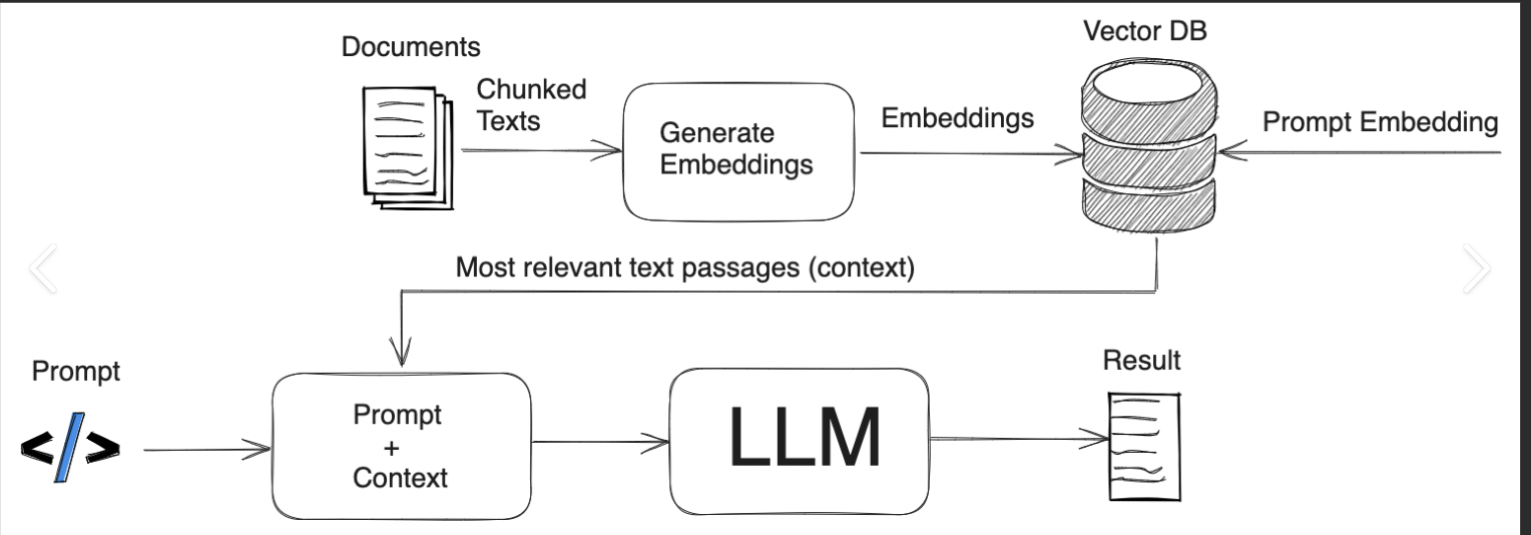
RAG (Retrieval-Augmented Generation) enhances AI responses by retrieving relevant external data before generating a response from an LLM.
- Retrieval – Retrieve (from a Vector DB)
- Augment – Combine the retrieved information with the original query
- Generation – The LLM then uses this augmented data to generate a response to the user’s query.
In the first place why should we retrieve data form external system?
Retrieving data from an external system ensures that the LLM generates more accurate, up-to-date, and contextually relevant responses, especially for dynamic or domain-specific queries beyond its trained knowledge.
Can you explain with one real world use case?
RAG can be used at different levels based on the product requirement, let me give an example with one of the use case at a product platform level , which i worked.
In complex product platforms, we document solutions to recurring production issues in a runbook to streamline future resolutions. One such challenge we faced was during Blue-Green deployments using AWS RDS. While AWS claims the migration and switching take only a few seconds, real-world scenarios proved otherwise. Through 30+ deployments, we discovered that fine-tuning database parameters was crucial in reducing replication time and ensuring a seamless transition—insights not documented in any standard LLM.
To make this kind of knowledge easily accessible, we integrated an LLM-powered assistant with our Confluence knowledge base using Retrieval-Augmented Generation (RAG). This setup ensures that queries to the LLM are enriched with real-world, product-specific insights, enabling developers to get precise answers instantly.
This approach not only democratized critical knowledge but also enhanced automation and self-healing capabilities within our systems. By leveraging RAG, we bridge the gap between static documentation and real-time AI assistance, empowering our teams with actionable intelligence at their fingertips.
What are embeddings?
Embeddings are numerical representations of data (such as words or items) in a high-dimensional vector space, where similar data points are mapped closer together. Examples include Word2Vec and FastText.
What is Vector DB?
A vector database is a specialized database designed to efficiently store, search, and manage vector embeddings.
Examples:
- On-Premises: FAISS, Weaviate
- Managed Vector Databases: Pinecone, Weaviate, Milvus
Embeddings in Vector DB:
In a vector database, words are represented as numerical embeddings based on their semantic meaning.
Example Embeddings:
- “mysql” → [0.32, -0.47, 0.51, …, 0.15]
- “oracle” → [0.30, -0.45, 0.48, …, 0.14]
- “tcp” → [0.52, -0.30, 0.78, …, 0.12]
If a query is made with the word “oracle”, the vector database will identify the most similar vector. In this case, it would likely return “mysql” since both are database management systems (DBMS) and have closely related embeddings, just have a look at those numbers also, how close they are, whereas “tcp” is conceptually different and farther in vector space and the numbers are also little farther.
How are these words retrieved from vector DB with numbers being in vector DB?
This is achieved using algorithms that identify information semantically related to the user’s query.
Examples of Algorithms:
- K-Nearest Neighbor (k-NN)
- Hierarchical Navigable Small World (HNSW)
Using these algorithms, we retrieve relevant data and append it to the user’s query before passing it to the LLM. This provides the LLM with additional context that it wouldn’t have otherwise, enhancing its understanding. This process is known as augmentation.
Benefits of Augmentation
- Improved accuracy and richness of responses.
- Decreased ambiguity when the user’s query lacks sufficient context.
- Faster and more scalable retrieval of relevant knowledge using pre-existing information in the database.
Let us understand this with an example on how a query is augmented
Step 1: User Query: “User Query: “How can I control replica lag in MySQL?
Step 2: Search in Vector DB:
The vector database retrieves documents related to replica lag and DB parameters associated with replication SQL thread which are already fed
Step 3: Augment the Query
The system then combines the retrieved information with the original query to form an augmented query:
Augmented Query: “How can I control replica lag in MySQL? Replica lag can be controlled by tuning the following DB parameters associated with replication SQL thread: binlog_order_commits = 0, binlog_group_commit_sync_delay = 1000, slave_parallel_type = LOGICAL_CLOCK, slave_preserve_commit_order = 1. Additionally, you can adjust slave_parallel_workers = 2, innodb_flush_log_at_trx_commit = 0, and sync_binlog = 1 to control replication behavior and performance.”
Where is the source of additional data ?
The data is retrieved from a Vector Database that we populated using our knowledge base, which includes sources such as Confluence pages ( used this in my example here ), databases, support tickets, GitHub repositories, and more.
Step 4: The augmented query is now sent to the LLM, which now has all the relevant information to generate a complete, detailed response.
Quick Example running through all the above steps:
Knowledge Base – Confluence
https://helloravisha.atlassian.net/wiki/external/OTJmYWI0MjkwOWViNDg0YmEzMjRiZGYxYWMwNzdkZGY
RAG Python code – Confluence, Open AI
from dotenv import load_dotenv
from langchain.embeddings.openai import OpenAIEmbeddings
from langchain.vectorstores import FAISS
from langchain.chains import RetrievalQA
from langchain.chat_models import ChatOpenAI
from atlassian import Confluence
import os

# Step 1: Load environment variables (for Confluence credentials and OpenAI API key)
load_dotenv()  # Loads .env file containing API credentials

# Connect to Confluence using API
confluence = Confluence(
    url=os.getenv("CONFLUENCE_URL"),
    username=os.getenv("CONFLUENCE_USERNAME"),
    password=os.getenv("CONFLUENCE_API_TOKEN")
)

# Step 2: Fetch documents (pages) from Confluence
def fetch_confluence_pages(space_key):
    # Fetch all pages from a specific Confluence space
    pages = confluence.get_all_pages_from_space(space_key, start=0, limit=50)  # Adjust limit as needed
    docs = []
    for page in pages:
        content = confluence.get_page_by_id(page["id"], expand="body.storage")
        text = content["body"]["storage"]["value"]  # Extract raw HTML content
        docs.append((page["title"], text))  # Store title and content
    return docs

# Replace with your space key
space_key = "5d27ad527d35310c144"
confluence_docs = fetch_confluence_pages(space_key)

# Convert Confluence page content into text format (title + content)
docs = [f"{title}: {text}" for title, text in confluence_docs]

# Step 3: Convert the text documents to embeddings using OpenAI


# Step 4: Set up the retriever to search through the vector store
retriever = vectorstore.as_retriever()

# Step 5: Create a Retrieval-Augmented Generation (RAG) QA system
qa_chain = RetrievalQA.from_chain_type(llm=ChatOpenAI(), retriever=retriever)

# Step 6: Ask a question (retrieves data from FAISS before responding)
query = "what parameters i should tune in to control  replica lag , tell me the values for  sync_binlog"
response = qa_chain.run(query)
print(response)
 My Experiences with Microservices / Cloud Services / Machine Learning / CI CD